Building AI-Promptable Full-Stack Apps with TanStack Start
Every time our team started a new full-stack React app, we faced the same problem: rebuild the same architecture from scratch. JWT authentication, database access, UI shell, TanStack AI integration, observability, and server boundaries — all the plumbing that has nothing to do with the actual business logic.
It started with internal tools at MongoDB, but the patterns apply to any full-stack web application — a customer-facing product, an admin dashboard, or a side project. After shipping several apps this way, we extracted the architecture into a TanStack Start template that is promptable by design: the same server functions power the UI and AI tools, external services stay behind interfaces, and the entire contract is codified as Agent Skills so coding agents don't break invariants.
Note:
The guidelines and architecture in this post are based on real-world experience building internal and customer-facing tools. They reflect lessons learned around schema boundaries, isomorphic execution, and agent tooling in production.
The Problem
Most full-stack web applications share a remarkable amount of infrastructure:
- A database-backed API with CRUD operations and filtering
- Authentication and traceability from request headers
- An accessible component library with dark/light mode
- Safe server boundaries (preventing secret/driver leaks into client bundles)
- Error monitoring, structured logging, and performance tracing
- Increasingly, an AI assistant that can query data, navigate, and perform permitted mutations
Yet every project starts from pnpm init and rebuilds all of this. The code looks similar but is never quite the same, making it hard to maintain consistent patterns across a growing portfolio of applications.
The Chosen Tech Stack
We chose TanStack Start as the foundation — a full-stack React meta-framework that gives us:
- Server functions (
createServerFn) that act as type-safe RPC endpoints - File-based routing with TanStack Router (see also our production TanStack Router conventions)
- SSR via Nitro, deployable anywhere (Netlify, Node, Docker)
- Middleware pipeline that runs on requests to build typed context (
next({ context }))
For the UI, Mantine gives us 120+ accessible components, dark/light mode out of the box, responsive mobile-first props, and a theme system that keeps things consistent without writing custom CSS. For icons, we standardize on lucide-react.
For AI, TanStack AI provides a unified interface across OpenAI, Anthropic, Gemini, and Netlify AI Gateway — with first-class support for tool calling, client-side tools, and streaming.
For quality and testing, Biome handles fast linting and formatting, Vitest runs unit tests in jsdom, and Playwright executes end-to-end tests against in-memory seed data.
Architecture: Everything Behind an Interface
The core principle is simple: every external service is accessed through an interface. This makes the database, auth, AI provider, and observability layer swappable without touching application code.
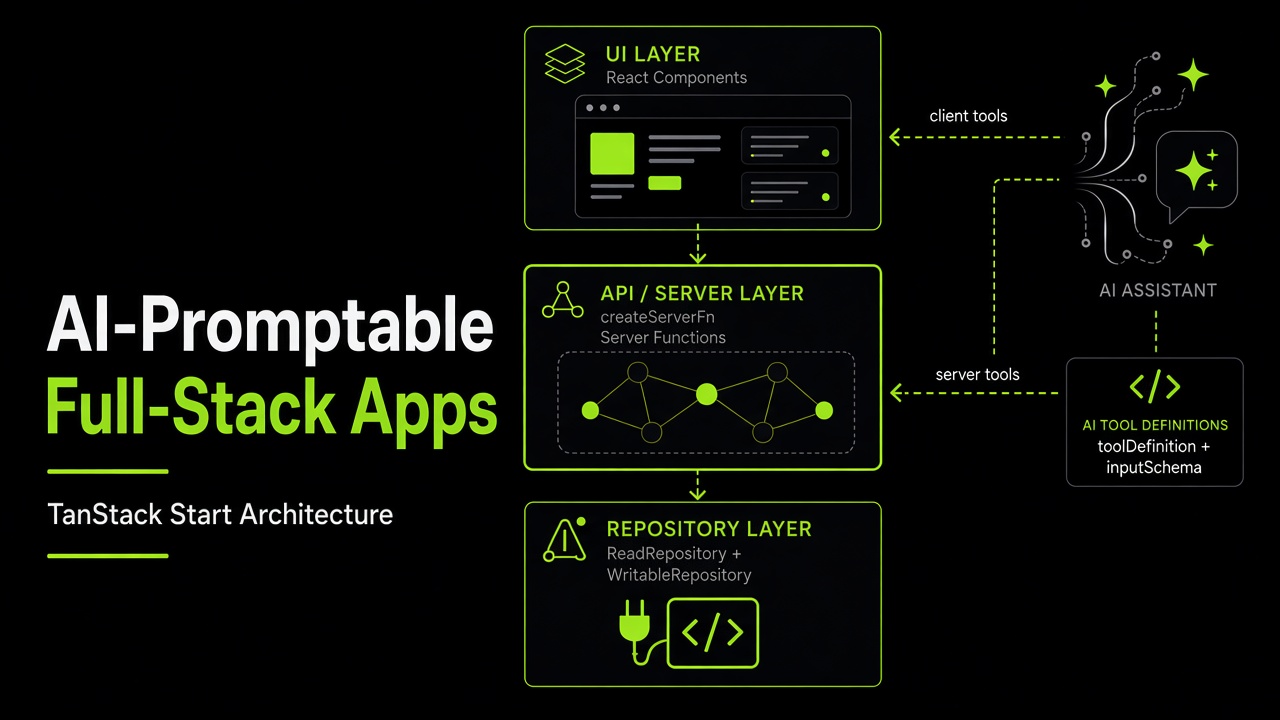
Runtime flow: server tools call the same createServerFn endpoints as route loaders and UI handlers; client tools (navigation, cache invalidation) run in the browser. The repository layer is a swappable interface — never accessed directly by AI tools.
The Repository Pattern
All data access goes through a ReadRepository + WritableRepository interface that speaks exclusively in repository-layer types:
export interface ReadRepository {
  getTasks(filter?: TaskRepoFilter): Promise<TaskRepo[]>
  getTask(taskId: string): Promise<TaskRepo | null>
  getDistinctValues(field: DistinctValueField): Promise<string[]>
  getUserProfile(email: string): Promise<UserProfileRepo | null>
  getUserAccess(email: string): Promise<UserAccessRepo | null>
}

export interface WritableRepository {
  createTask(input: TaskRepoInput, trace?: TraceabilityContext): Promise<TaskRepo>
  updateTask(taskId: string, input: Partial<TaskRepoInput>, trace?: TraceabilityContext): Promise<TaskRepo | null>
  deleteTask(taskId: string): Promise<boolean>
}
Two implementations ship with the template:
- SeedRepository — in-memory with sample data. Zero configuration, works instantly for local dev and CI.
- MongoRepository — production MongoDB implementation.
A factory function auto-detects which to use based on whether MONGODB_URI is set (or explicit REPOSITORY_TYPE). For development, you never need a database running.
Traceability on Writes
Notice the TraceabilityContext argument on WritableRepository methods:
export interface TraceabilityContext {
  createdBy?: string
  lastModifiedBy?: string
}
Instead of passing ad-hoc email strings across handlers, write operations pass a structured traceability object built from the auth ticket (createWriteTrace on create, updateWriteTrace on update). Repositories persist these audit fields directly onto the entity (createdBy and lastModifiedBy), ensuring full auditability whether a mutation was triggered by the UI or by an AI tool call.
The Three-Layer Schema Architecture
A common failure mode in full-stack TypeScript apps is type erasure or schema drift. We organize schemas into three distinct layers:
Route search schema (Layer 3: URL-shaped)
       ↓ (loaderDeps / loader)
Tools schema (Layer 2: API & AI-shaped, carries .describe())
       ↓ (createServerFn handler mapping via Schema.parse)
Repository schema (Layer 1: DB-shaped)
       ↓
Database / Repository Implementation- Repository layer (
repository.ts): Persisted DB document shapes. No.describe()needed here because these are internal. - Tools / Server function layer (
schemas.ts): API-shaped schemas shared betweencreateServerFn(.inputValidator(Schema)) and AItoolDefinition({ inputSchema }). Every field has.describe()so the LLM receives rich JSON Schema metadata explaining what each parameter means. - Router search layer: Local
validateSearchschemas in route files representing URL query parameters.
Boundary Mapping
Layer switches happen strictly via mapper functions with Schema.parse() at each boundary:
// Inbound: Tools layer → Repository layer
const repoFilter = filter ? TaskRepoFilterSchema.parse(filter) : undefined
const repoInput = TaskRepoInputSchema.parse(data)

// Outbound: Repository row → Tools layer (for UI loaders & AI tools)
export function toToolTask(row: TaskRepo): Task {
  return TaskSchema.parse(row)
}
After Schema.parse(), preserve inferred TypeScript types end-to-end — prefer satisfies, discriminated unions, narrow type guards, and exhaustive switch with assertNever over any or loose as type casts.
Why Zod?
ArkType is a great alternative and I personally like its syntax. We chose Zod for this template because of its broad ecosystem adoption and first-class tooling. Because the architecture is interface-first, you can swap to ArkType or Valibot by maintaining the same schema boundaries.
Server Execution Boundaries & Isomorphic Loaders
TanStack Start route loaders are isomorphic: they run on the server during SSR and in the browser during client-side SPA navigations.
Treating route files as purely server-side code is a dangerous trap that can leak database drivers, secrets, or Node SDKs into client bundles.
The Rules We Enforce
- Route files are thin: They only declare
createFileRoute,validateSearch,loaderDeps,loader, andcomponent. - No direct DB/repo imports in routes: Loaders only call exported
createServerFnendpoints fromsrc/services/api/serverFns.ts. *.server.tsnaming convention: Database clients (mongoClient.server.ts), repository loaders (getRepository.server.ts), and crypto utilities (jwt.server.ts) use the.server.tssuffix or start withimport '@tanstack/react-start/server-only'.createServerOnlyFnfor internal singletons: Internal factories that must never be client-callable (like DB connection getters) usecreateServerOnlyFninstead ofcreateServerFn.- Vite import protection:
vite.config.tsconfiguresimportProtectionwithbehavior: 'error'to immediately fail the build if server files or sensitive packages enter the client bundle:
tanstackStart({
  importProtection: {
    behavior: 'error',
    client: {
      specifiers: ['mongodb', 'jose'],
      files: ['**/services/db/**', '**/repository/*.server.ts', '**/env/**'],
    },
  },
})
Request Context & Middleware Pipeline
TanStack Start supports composable middleware where each middleware enriches context via next({ context }).
Auth via Typed Access Ticket
The auth middleware (src/middleware/auth.ts) reads the JWT from the configured AUTH_HEADER_NAME (default: Authorization), extracts identity claims, loads the user's profile and roles from the repository, and constructs an AccessTicket:
export const authMiddleware = createMiddleware().server(async ({ next, request }) => {
  const authHeader = request.headers.get(AUTH_HEADER_NAME)
  const identity = extractIdentityFromJwt(authHeader)

  let profile = null
  let roles: string[] = []

  if (identity.email) {
    const [userProfile, userAccess] = await Promise.all([
      getReadRepository().getUserProfile(identity.email),
      getReadRepository().getUserAccess(identity.email),
    ])
    profile = userProfile
    roles = userAccess?.roles ?? []
  }

  const accessTicket = createAccessTicket({ identity, profile, roles })
  return next({ context: { accessTicket } })
})
The AccessTicket encapsulates user identity, roles, and authorization helpers (requireTaskCreator, requireRole).
Middleware Chaining
We chain middleware to infer typed context on server functions:
// Queries: GET server functions (unauthenticated by default)
export const getTasks = createServerFn({ method: 'GET' })
  .inputValidator(TaskFilterSchema.optional())
  .handler(async ({ data: filter }) => {
    const repoFilter = filter ? TaskRepoFilterSchema.parse(filter) : undefined
    const rows = await getObservability({}).startSpan('getTasks', () =>
      getReadRepository().getTasks(repoFilter)
    )
    return rows.map(toToolTask)
  })

// Mutations: POST server functions chain requireAuthMiddleware and invalidateMiddleware
export const updateTask = createServerFn({ method: 'POST' })
  .middleware([requireAuthMiddleware, invalidateMiddleware])
  .inputValidator(UpdateTaskInputSchema)
  .handler(async ({ data, context }) => {
    const task = await getReadRepository().getTask(data.taskId)
    if (!task) throw new HttpError(404, 'Task not found')

    // Server-enforced authorization guard
    context.accessTicket.requireTaskCreator(task)

    const repoUpdates = TaskRepoInputSchema.partial().parse(data.updates)
    const trace = updateWriteTrace(context.accessTicket.identity.email)
    const row = await getObservability({}).startSpan('updateTask', () =>
      getWritableRepository().updateTask(data.taskId, repoUpdates, trace)
    )
    return row ? toToolTask(row) : null
  })
Key aspects of this pipeline:
requireAuthMiddleware: Enforces thatcontext.accessTicketis authenticated for mutations; throws 401 if anonymous.invalidateMiddleware: Instructs the client router to automatically callrouter.invalidate()after a successful POST mutation. Components never trigger manual invalidations.- No manual context casts: TypeScript automatically infers
context.accessTicketfrom the middleware chain.
Centralized Observability & Env Validation
Instead of scattering process.env calls across the codebase, we parse environment variables once at startup into a validated schema:
process.env → webServerEnv (server-only secrets + configs)
→ shellSession (browser-safe projection: public env + app version)src/env/webEnv.server.ts: Parses and validatesWebServerEnvSchemalazily on first access.src/middleware/webEnv.ts: InjectsserverEnvandshellSessioninto request context.getBrowserShellSession: A GET server function called by the root route loader (__root.tsx) to project safe app metadata and public config to the browser without exposing secrets orwindow.__ENV__.- Structured logging:
createServerLogger('moduleName')binds the validated log level and environment to Pino loggers without readingprocess.envinside utility functions. - Error tracking: Sentry is bootstrapped before application startup via
instrument.server.mts. IfSENTRY_DSNis not provided, a no-op implementation is used.
Promptable by Design: AI Tools on the Same Server Functions
This is the pattern we are most excited about. TanStack AI tools call the same server functions that route loaders and UI event handlers use:
// src/services/ai/tools.ts
const getTasksToolDef = toolDefinition({
  name: 'getTasks',
  description: 'Get all tasks with optional filters. Supports status, priority, assignee, and search.',
  inputSchema: TaskFilterSchema,
})

export const getTasksTool = createSafeServerTool(getTasksToolDef, async (args) =>
  getTasks({ data: TaskFilterSchema.parse(args) })
)
Safe Tool Handlers
Instead of letting thrown HttpErrors crash the agent loop, createSafeServerTool wraps execution with safeToolHandler(). When an unauthorized mutation is attempted, it catches the 401/403/404 HttpError and returns a structured { error, code } response.
The AI assistant can then explain the failure politely:
- 401: "You need to log in to create tasks."
- 403: "Only the task creator can edit or delete this task."
Full Tool Coverage & Client Tools
The AI assistant is equipped with:
- Server tools:
getTasks,getTask,getDistinctValues(discovers real filter values like active assignees),getUserProfile,getUserAccess,getAppRuntimeInfo,getCurrentUserContext,createTask,updateTask,deleteTask. - Client tools: Executed directly in the browser via
@tanstack/ai-client:navigate: Callsrouter.navigate()with validated routes and search params.invalidateRouter: Callsrouter.invalidate()so the UI immediately refreshes after AI mutations.
Dynamic AI Context & Navigation Manifest
The chat endpoint (POST /api/chat) streams SSE responses using TanStack AI's chat(). The client attaches a BrowserContext (timezone, locale, current path, query string, full URL).
The server injects this into the system prompt alongside a navigation manifest derived from the router (buildAppNavigation(router)). This lets the AI resolve relative references: when a user on /tasks/task-123 says "Summarize this task and mark it done", the assistant extracts $taskId from the current location context and acts on it immediately.
const stream = chat({
  adapter,
  messages: convertMessagesToModelMessages(body.messages ?? []),
  systemPrompts: [systemPrompt],
  tools,
  agentLoopStrategy: maxIterations(10), // Bounded agent loop
})
All chat() invocations set an explicit agentLoopStrategy: maxIterations(10) to prevent runaway tool loops.
URL-as-State & Router Conventions
We follow opinionated router conventions:
- URL-as-State: Filters, pagination, and search queries live in URL search params validated with
validateSearch. They are shareable, bookmarkable, and survive refresh. loaderDepsfor caching: Specify exact dependencies (loaderDeps: ({ search }) => search) so loaders only re-fetch when relevant search keys change.- Debounced free-text search: To avoid re-running loaders on every keystroke, free-text inputs use uncontrolled inputs (
defaultValuefrom URL) and a debounced navigate callback. Discrete filters (dropdowns, segmented tabs) navigate immediately. - Search-preserving
Linkcomponent: We ship a project-localLinkwrapper withsearch: trueas the default so current query parameters are preserved when navigating between tabs and pages. - Parent layout loaders: Shared beforeLoad guards and expensive profile reads belong on the parent layout (
__root.tsx); child routes consume them viauseLoaderDatarather than repeating calls.
Distributing Best Practices via Agent Skills
Architecture documentation in a wiki or README often goes unread. When developers work with AI coding agents (Cursor, Claude Code, Windsurf), agents can easily introduce anti-patterns unless given explicit guidelines.
We packaged the entire architectural contract into Agent Skills published directly from the repository:
# Discover all available skills in this template repository
npx skills add carlosvin/tanstack-fullstack-ai-template --list

# Install the core architecture skill
npx skills add carlosvin/tanstack-fullstack-ai-template --skill tanstack-promptable-fullstack-app-template

# Install companion skills
npx skills add carlosvin/tanstack-fullstack-ai-template --skill observability-and-env
npx skills add carlosvin/tanstack-fullstack-ai-template --skill reference-tech-stack
The Three Published Skills
tanstack-promptable-fullstack-app-template(Core Architecture): Vendor-agnostic contract enforcing three-layer schemas, isomorphic loader safety, server boundaries, AI tool parity, URL-as-state, and middleware request context.observability-and-env: Invariants for single-parse startup env,webServerEnvvsshellSession, Pino logging factories, and Sentry bootstrap.reference-tech-stack: Concrete package defaults for this reference implementation (Zod, Mantine, MongoDB, jose, Biome, Vitest, Playwright, Netlify).
Whenever an AI agent generates new entities, server functions, or routes in projects using this skill, it adheres to these invariants automatically.
Getting Started
You can spin up the full template locally in seconds:
git clone https://github.com/carlosvin/tanstack-fullstack-ai-template.git my-app
cd my-app
pnpm install
pnpm dev
Open http://localhost:3000. The app starts with in-memory seed data — a complete task management application with a responsive dashboard, filtered lists, detail views, task CRUD, and the AI chat drawer. No database, no API keys, and no environment variables required.
Testing and Validation
Run the complete validation suite:
pnpm format    # Auto-format with Biome
pnpm lint      # Lint and typecheck with Biome + tsc
pnpm test      # Run unit tests with Vitest
pnpm test:e2e  # Run Playwright E2E tests against seed data
pnpm build     # Verify production SSR build
When you are ready to connect production services, configure the environment variables in .env:
| Variable | Purpose |
|---|---|
MONGODB_URI | Connect a real MongoDB database (swaps from seed repository automatically) |
GEMINI_API_KEY or OPENAI_API_KEY | Enable the AI chat assistant (or deploy to Netlify for AI Gateway) |
SENTRY_DSN | Enable error and performance tracking |
AUTH_HEADER_NAME | Custom HTTP header for incoming JWTs (default: Authorization) |
Extending the Template
Adding a new domain entity is a repeatable six-step workflow:
- Schemas: Add repository-layer schemas in
repository.tsand tools-layer schemas with.describe()inschemas.ts. Create bidirectional mappers withSchema.parse(). - Repository: Declare methods on
ReadRepositoryandWritableRepository(acceptingTraceabilityContext). Implement inseedRepository.tsandmongoRepository.server.ts. - Server Functions: Create GET queries and POST mutations (with
requireAuthMiddlewareandinvalidateMiddleware) inserverFns.ts. - AI Tools: Expose the server functions as AI tools in
tools.tsviacreateSafeServerTool(). Add distinct-value discovery tools if applicable. - Routes & UI: Add file-based routes in
src/routes/withvalidateSearch,loaderDeps, and component UI. - Tests: Add unit tests for repository mappers and E2E specs in
e2e/using seed data.
Conclusion
The goal of this template is not to create another rigid framework — it is to provide a production-ready starting point for full-stack, AI-promptable applications.
By combining:
- Type-safe server functions and isomorphic loaders
- Three-layer schema validation with Zod
- Repository and service interfaces for complete swappability
- AI tools sharing the exact same code paths and authorization as the UI
- Codified Agent Skills for reliable AI-assisted engineering
You get a solid, maintainable foundation that saves weeks of repetitive scaffolding on every new project.
Built with TanStack Start, Mantine, TanStack AI, MongoDB, Zod, Sentry, Vitest, Playwright, and Biome.